New Build - 06/05/2025 - r61648

Post new topic   Reply to topic    DD-WRT Forum Index -> Qualcomm Atheros based Hardware
Goto page Previous  1, 2
Author Message
kernel-panic69
DD-WRT Guru


Joined: 08 May 2018
Posts: 17511
Location: Texas, USA

PostPosted: Sat Jun 07, 2025 20:47    Post subject: Reply with quote
@Andr0med: Not knowing the volume of feedback on the nightly alpha builds, not seeing any large volume of feedback on public builds, it is what it is. In the past, people used to foam at the mouth on when the next release would drop. There are people who are not very active on this forum anymore, heavy decline over the past several years with only random appearances. Also, expecting someone to test everything supported in their own inventory between releases is a little obtuse. RMerlin doesn't go on coding benders and he only supports a limited amount of devices. OpenWRT has an exponential amount of code developers comparatively speaking. Seems you want to call the orange an apple and make a cocktail or something. As already stated, you have a choice on how often or which releases to flash. /shrug
Sponsor
Wildlion
DD-WRT Guru


Joined: 24 May 2016
Posts: 1463

PostPosted: Sat Jun 07, 2025 21:52    Post subject: Reply with quote
Router: TL-WDR3600 v1
Firmware: tl-wdr3600_us-webflash.bin (v3.0-r61648 std)
Kernel: Linux 3.10.108-d11 #199837 Thu Jun 5 06:31:24 +07 2025 mips
Status: working
Reset: No
Notes on configuration:

    Station

Errors:

    none


Router: DIR-825 rev B1
Firmware: dir825-firmware.bin (v3.0-r61648 std)
Kernel: Linux 3.10.108-d11 #199835 Thu Jun 5 06:14:39 +07 2025 mips
Status: Working
Reset: None
Notes on configuration: Used for Wifi Lab (no internet)
Errors:

    None
jrscs
DD-WRT Guru


Joined: 09 Aug 2010
Posts: 570

PostPosted: Sun Jun 08, 2025 18:18    Post subject: MX4300 Reply with quote
Router/Version: Linksys MX4300 (Primary)
Firmware: DD-WRT v3.0-r61648 std (06/05/25)
Kernel: Linux 6.6.92-rt29 #3446 SMP Thu Jun 5 07:07:48 +07 2025 aarch64
Previous: DD-WRT v3.0-r61613 std (06/02/25)
Update Method: WebUI
Mode/Status: Gateway/Ok
Reset: No
Setup:
WAN Connection Type: Static IP
Shortcut Forwarding Engine: NSS-ECM, QoS: Disable
Wlan0, Mesh/802.11s 5.0 GHz AX-only 80 MHz WPA3
Wlan1, AP 2.4 GHz N/G Mixed 20 MHz WPA2
Wlan2, AP 5.0 GHz AX/AC/N Mixed 80 MHz WPA2
IPv4, DHCP, DNSMasq, Static Leases, Port Forwarding
USB 3.2 Gen 1 (USB 3.0) Seagate One Touch 2TB STKB2000400 (exFAT), NAS, Samba (Restricted User/Password)
NTP Client, Wireguard Server, Wake-on-WAN (Internet), SSH (public key)
Issues/Errors: None/OK

Router/Version: Linksys MX4300 (Node)
Firmware: DD-WRT v3.0-r61648 std (06/05/25)
Setup:
WAN Connection Type: Static IP
Shortcut Forwarding Engine: NSS-ECM, QoS Disable
Wlan0, Mesh/802.11s 5.0 GHz AX-only 80 MHz WPA3
Wlan1, AP 2.4 GHz N/G Mixed 20 MHz WPA2
Wlan2, AP 5.0 GHz AX/AC/N Mixed 80 MHz WPA2
Issues/Errors: None/OK

Thanks BrainSlayer

_________________
Linksys MX4300: Primary & Node
Retired: Netgear XR500, R7800; Asus AC87U A1, RT-AC68R A1, RT-AC66U A1
Retired Repeater Bridge: Netgear R6400v2otp
commodore
DD-WRT User


Joined: 20 Jun 2010
Posts: 196

PostPosted: Tue Jun 10, 2025 16:14    Post subject: Reply with quote
Router/Version: TP-Link WR1043ND V3
File/Kernel: DD-WRT v3.0-r61648 std (06/05/25)
Previous/Reset: No
Mode/Status: Router/DHCP
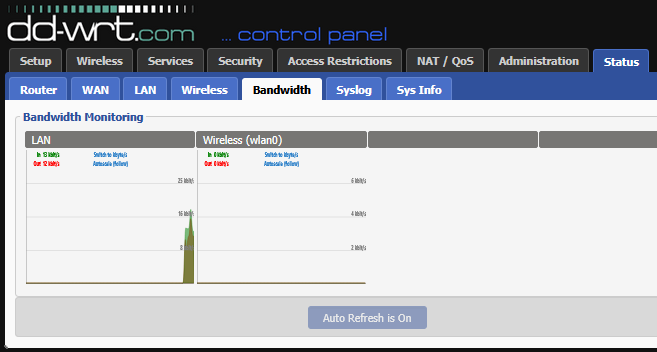
Issues/Errors: Bandwidth graphs smaller and two missing
I now try a new version about once a month. Starting with r61238, the bandwidth section has tiny graphs in one row. Not sure if this is by design or some table misalignment. The last update I did (r61648) is also missing two adapters, so now it's just this:
delboy@HK
DD-WRT Novice


Joined: 04 Jun 2021
Posts: 9

PostPosted: Tue Jul 01, 2025 15:45    Post subject: Reply with quote
commodore wrote:
Router/Version: TP-Link WR1043ND V3
File/Kernel: DD-WRT v3.0-r61648 std (06/05/25)
Previous/Reset: No
Mode/Status: Router/DHCP
Issues/Errors: Bandwidth graphs smaller and two missing
I now try a new version about once a month. Starting with r61238, the bandwidth section has tiny graphs in one row. Not sure if this is by design or some table misalignment. The last update I did (r61648) is also missing two adapters, so now it's just this:


Yeah, If you restore from older backup it will show the old style.

if you start new setup, it will end up like this.....
Goto page Previous  1, 2 Display posts from previous:    Page 2 of 2
Post new topic   Reply to topic    DD-WRT Forum Index -> Qualcomm Atheros based Hardware All times are GMT

Navigation

 
Jump to:  
You cannot post new topics in this forum
You cannot reply to topics in this forum
You cannot edit your posts in this forum
You cannot delete your posts in this forum
You cannot vote in polls in this forum
You cannot attach files in this forum
You cannot download files in this forum